|
|
|
|
|
|
|
IT Project ROI Calculator and Business Case Toolkit
Rapidly develop comprehensive business cases (investment justifications) for most IT initiatives.
This free Excel-based tool helps organizations to assess, quantify, and communicate the costs, benefits, business value, and ROI of most types of enterprise-scale technology-based initiatives. It also helps to assess the organization’s current (as-is) and expected (to-be) IT spending (TCO) levels and the solution’s impact on a variety of key performance indicators (KPIs). It produces quality, highly customized, and editable Microsoft Word business case reports that can be presented to decision-makers and customers. |
|
|
|
|
|
|
|
Author |
Hall Consulting & Research |
|
|
|
|
|
|
| |
|
|
|
|
|
|
|
|
| Tool Details:
|
IT Project ROI and Business Case Toolkit
Enables rapid development of comprehensive business cases for most IT projects.
The IT Project ROI and Business Case Toolkit enables rapid development of comprehensive business cases (investment justifications) for IT projects. It helps organizations to assess, quantify, and communicate the costs, benefits, business value, and ROI of most types of enterprise-scale technology-based initiatives. It also helps to assess the organization’s current (as-is) and expected (to-be) IT spending (TCO) levels and the solution’s impact on a variety of key performance indicators (KPIs). It produces high quality, customized, and editable business case reports that can be presented to decision-makers and customers.
The tool estimates the costs required to implement the new capabilities/solution, including hardware, software, IT labor, services, and user labor. It simulates benefits (user productivity, IT TCO savings, business cost savings, revenue growth, and KPI improvements) enabled by the solutions selected.
It supports both rapid (30 minute) and highly detailed assessments. The tool uses robust industry best-practice methods and extensive research to assist the organization in rapidly assessing the costs and benefits of investing in the IT initiative. However, this tool cannot accurately/credibly estimate costs/benefits without review, validation, and adjustment of key data inputs. These inputs should be customized to each particular organization and scenario.
The toolkit is powered by (hosted on) the AnalysisPlace.com platform and was developed by Hall Consulting & Research LLC (http://hallcr.com). The tool supports key AnalysisPlace capabilities such as currency and language switching, collaboration/sharing, scenario analysis, and change tracking.
This toolkit can be used as a standard corporate business case template. It can also be used by consultants and technology vendors to articulate the business value of their products and solutions.
Basic registration (ID, e-mail, password) at AnalysisPlace.com is required to use the tool. Registration credentials are required to log into the tool after being downloaded.
Summary of Key Tool Features
- Supports most types of enterprise-scale technology initiatives. Includes sample cost and benefit data for 18 common initiative types
|
Infrastructure/Platform Technology Initiatives
|
Business Technology Initiatives
|
|
PC Hardware & Operating System Upgrades
Server Hardware & Software Upgrades
Infrastructure Management / Networking
Storage
Security
Application Development / Architecture
Compliance, Governance, & Risk
Outsourcing
Wireless / Mobile
|
Office Productivity Software
Messaging / Collaboration
Content Management
E-commerce / Internet
Business Process Mgmt / Integration
Business Intelligence / Data Mgmt
Business Applications (Vertical, Line-of-Business)
CRM
ERP / Supply Chain
|
- Comprehensive assessment of initiative costs and benefits
- Costs: hardware; software; IT labor, training, and services; and user labor and training. All direct and indirect, one-time and on-going costs needed to implement and support the initiative.
- Benefits: IT labor TCO savings, other direct cost savings, user productivity benefits, revenue growth, and non-financial key performance indicators
- Calculates annual on-going IT spending (TCO - total cost of ownership), including hardware, software, internal IT personnel, external service providers, and telecommunications
- Comprehensive financial analysis. Calculates project cash flow, cost-benefit analysis, ROI, NPV, IRR, and payback period
- Supports rapid (30 minute) or detailed assessments. This model was designed to provide either a rapid assessment (by just entering/selecting basic organizational profile and initiative information) or a very detailed assessment by modifying hundreds of detailed inputs.
- Supports most common scenarios
- Protected, yet customizable: Essentially all input values can be modified. Many custom cost and benefit items can be added. Formulas and other areas of the model that should not be modified are protected (locked) to maintain intended functionality. HCR can provide additional fee-based customization, if desired.
- Research-based - Methods, calculations, and default values are based on extensive research. Research sources (including excerpts/statistics) are included where appropriate. Research sources can include: case studies, analyst research, subject matter experts, detailed customer ROI studies, scholarly articles, white papers, etc. It is as transparent as possible so the user is able to understand how the costs and benefits are calculated.
- Provides research-based default/sample values. Default values (labor costs, user type mix, financial information, TCO, benefits, etc.) are provided based on selected industry, geography, organization size and initiative type to enable more rapid assessments. Extensive research was conducted to find highly reputation sources for these. Data/estimate sources are listed. You may overwrite any of the pre-populated defaults.
- User-friendly. The workbook contains instructions, descriptions, and references. Results are updated real-time and are displayed graphically throughout the model. Although the model is user-friendly, we recommend users have at least a moderately-advanced understanding of business value concepts to develop a credible business case.
- Free download. Basic registration is required.
Tool Components and Capabilities
The key capabilities and components of the tool are summarized below.
Costs (the investment)
Estimates all costs (direct and indirect) needed to implement, fully adopt, and support the solution. Cost categories include: hardware, software, IT labor, and user labor, including one-time and annual on-going costs.
|
Hardware
|
Software
|
IT Labor, Services, & Training
|
End-User Labor & Training
|
|
PCs (new/upgraded)
Servers
Mobile devices
Storage
Networking equipment
|
Client/server applications
Client/server operating systems
Client access licenses (CALs)
Databases
Utilities
|
Planning, Evaluation and Project Management
Engineering
Development
Lab Testing
Pilot Testing
Rollout
Performance Tuning
Documentation
Implementation User Support
Consultants
External Services
Maintenance/ support
IT training (formal external, formal internal, self-study)
|
Solution planning & testing
Downtime (Unable to be productive); e.g. during implementation of the solution
Resolution of issues related to the new solution
System configuration
Data entry
End-user training and ramp-up
|
IT Spending / TCO (Total Cost of Ownership) Assessment
Estimates annual on-going/recurring labor and services required to support and maintain the "as-is" (current or status quo) and "to-be" (after the solution is deployed) environment. This sheet can support basic TCO benchmarking analysis.
|
Hardware
|
Software
|
Internal IT Personnel
|
External IT Services
|
Telecom / Networking
|
|
PCs
Peripherals
Servers
Storage
|
Desktop / Productivity Applications
Enterprise Applications
Engineering, Vertical-Specific, & Other Applications
System/Infrastructure Software
|
Application development
Application support
Data center
Desktop / Client
Help desk
Voice Network
Data Network
Management & Administration
|
Consulting
Application Development
IT Management / Operations
Business Process Management / Outsourcing
|
Network/Communication Equipment
Mobile Devices
Fixed Network Services
Wireless/Mobile Telecom Services
|
Benefits Analysis
Estimates direct and indirect benefits enabled by the initiative -- the "return" part of ROI. Includes direct cost savings, user productivity benefits, and revenue (margin on) impacts.
|
IT Labor/Services TCO Savings
|
Other Direct Cost Savings
|
User Productivity Benefits
|
Revenue Growth
|
|
PC Management Services
Help Desk (Tech Support)
Server & Network Mgmt Services
Application Development
Administration & Other
|
IT Savings
Software - Clients
Software - Servers
Hardware
IT Services
Power/Electricity Usage
Business Savings
Travel Expenses
Business Services
Operating Expenses
|
Individual Computing
Document Creation
Data & Information Access/Analysis
Email, Calendar, Contact, & Task Mgmt
LOB Application-Related Activities
Collaborative Computing
Document Collaboration
Workflow (routing)
Coordination / Project Mgmt
PC Systems Management
Support, Self-Help, & Learning
Performance
Mobility & Remote Connectivity
Security & Privacy
System UI Navigation
Availability & Reliability
|
Improved Sales Effectiveness
Improved Marketing Effectiveness
Improved Customer Service
New/Expanded Channels/Geographies
New/Enhanced Products/Services
Improved Product Availability (fill rate, up-time)
|
KPIs (Key Performance Indicators) Assessment
Assessment of how the solution may impact a variety of business KPIs. In this model, these KPI changes are not converted into financial benefits. There are 4-7 specific metrics/KPIs in each category:
|
Sales/Marketing Performance
|
Business Management Effectiveness
|
Supply/Operations Performance
|
Technology Effectiveness
|
|
Customer Acquisition
Customer Retention
Customer Satisfaction
Sales-based document collaboration Efficiency
|
Decision-Making Speed / Reaction Time to Market Event/Opportunity
Business Visibility
Business Alignment
Decision-Making Effectiveness
Information Availability
Information Quality
Analysis/reporting Time
|
Quality of Products/Services
Defect rate
Forecast Accuracy
Supply Chain Effectiveness
Cash Cycle Time
Compliance
Project management effectiveness
|
Records Compliance (centralized content control)
Service Level Agreement Performance
Maturity Level
System response time
Application delivery agility
User computing experience satisfaction
Security
|
Financial Analysis (ROI)
This worksheet contains tables and charts that summarize the results of the tool. It consolidates results from all of the other worksheets and analyzes the results (compares costs to benefits). It includes: a summary of the costs & benefits by type; cash flow analysis; the impact to key performance indicators; and calculation of ROI, payback period, NPV, and IRR.
Description of Initiative Types Included In the Model
NOTE: Sample data should not be used for making investment decisions. Sample data is not meant to represent average/typical project results and is not based on research. It should only be used as a starting place for assessing the business value of your project. Initiative costs and benefits may differ substantially from one organization to another.
Infrastructure/Platform Technology Initiatives
|
Initiative Type
|
Key Features, Capabilities, Benefits
|
Sample Vendors And Products
|
|
PC Hardware & Operating System Upgrades
|
• Improved performance, reliability, security, manageability, productivity
• Notebook, desktop, thin-client, tablet
|
• Microsoft Windows 7, Linux, Red Hat, Novell, Apple
• Dell, HP, Apple, Toshiba, Lenovo, Fujitsu, Acer, Sony, Gateway
• Intel, AMD
|
|
Server Hardware & Software Upgrades
|
• Virtualization, consolidation, clustering, real-time infrastructure, self-service provisioning, power and cooling
• Improved performance, reliability, manageability, security
• Multi-core, 64-bit, RISC/Itanium, x86
• Web servers, application servers, DBMS servers, data warehouse servers, infrastructure servers, high performance computing servers
|
• Microsoft Windows Server, Novell SUSE, Red hat, Unix, Solaris, IBM AIX, HP–UX
• IBM, HP, Dell, Sun, Fujitsu, Bull
|
|
Infrastructure Management / Networking
|
• Asset inventory/management, OS management, configuration management, change management, systems management, software distribution, application packaging
• Directory services, group policy objects
• IPV6, LAN, WAN, bandwidth upgrades, mobile and wireless
• VOIP – voice over Internet protocol
|
• Microsoft System Center Configuration Manager, IBM Tivoli, BMC Software, CA Unicenter, HP, LANDesk, Novell ZENworks, Symantec Altiris, Cisco Systems
|
|
Storage
|
• Digital storage of business data and documents
• Archival, records management, tape backup, SAN, NAS, disk arrays, iSCSI, fibre channel
• Capacity management, performance analysis, storage provisioning, quota management, event management
|
• EMC, HP, IBM, Sun, Hitachi, EDS, Network Appliance
• IBM DB2, Microsoft Exchange, Microsoft SQL Server, Oracle, SAP
|
|
Security
|
• Security planning, assessment, incident/breach management
• Identity and access management, encryption, smartcards, authentication, authorization, patch management
• Firewalls, antivirus, anti-malware, anti-spyware, network access control, information and data rights management
|
• McAfee, Symantec, CA, Trend Micro
• Cisco Systems, NetIQ
• VeriSign, IBM, Unisys
|
|
Application Development / Architecture
|
• Improved software quality, integration, usability
• Custom developed software
• Rapid application development
• Middleware, application server
• Web services, Service-Oriented Architecture, SaaS (software as a service)
• Enterprise architecture (EA)
|
• Microsoft .NET, Visual Studio
• IBM WebSphere, Rational
• Sun Microsystems Java
• Java/J2EE/EE, Ruby on Rails, PHP, Python, Perl
• Oracle Fusion Middleware, Application Server
• BEA Systems WebLogic, JBoss (Red Hat), SAP NetWeaver
|
|
Compliance, Governance, Risk
|
• Methods and software to ease compliance with regulations such as HIPPA, Sarbanes-Oxley, Basel II
• ITIL, COBIT, Six Sigma, CMM, ISO 17799/9000, PMBOK
• Maturity / capability models
• Portfolio management, IT-business alignment, balanced scorecard, service level management, risk management, data security, sustainability
• Business continuity – disaster planning / recovery
• IT governance, policies, internal audit, monitoring
|
• Accenture, BearingPoint, CSC, Deloitte, Ernst & Young, IBM, Infosys, KPMG, PricewaterhouseCoopers, Wipro
• BWise, IBM OpenPages, Thomson Reuters, Oracle, MetricStream, SAP, SAS
|
|
Outsourcing
|
• Outsource IT and business processes, applications, infrastructure, or initiatives to reduce costs and improve results
• Infrastructure management: helpdesk, on-site support, desktop management, data center services
• BPO – business process outsourcing
• Offshore services
• Application outsourcing, web hosting, cloud computing
|
• Accenture, Capgemini, Cognizant, CSC, EDS, IBM, HP, Siemens, CompuCom, Infosys, Keane, Perot Systems, Satyam, TCS, Wipro, Getronics, Unisys
• AT&T, IBM, MCI-Digex, Qwest, Rackspace, Verio
|
|
Wireless/Mobile
|
• Wireless e-mail, mobile access to line-of-business applications, unified communications,
• VPN, mobile remote access, telecommuting
• Handheld devices, smartphone, PDAs
• Wireless LAN/WAN, 802.11n, WiMAX, CDMA, UMTS, GPRS, EDGE
|
• Microsoft Windows Phone, Palm, Symbian
• RIM BlackBerry, Nokia, Apple iPhone, Sharp, Motorola/Symbol, Fujitsu,
• 3Com, Cisco Systems, Nortel Networks, Siemens
• Equant, AT&T, MCI, BT, Sprint, Verizon
|
Business Technology Initiatives
|
Initiative Type
|
Key Features, Capabilities, Benefits
|
Sample Vendors And Products
|
|
Office Productivity Software
|
• Word processing, spreadsheets, personal databases, presentation graphics software, personal information management, note-taking, task and project management, document creation and publishing
|
• Microsoft Office
• OpenOffice.org
• Sun StarOffice
• Google Apps
|
|
Messaging / Collaboration
|
• E-mail, calendaring/scheduling, task management, unified communications
• Real-time collaboration, presence, instant messaging, web conferencing
• Social computing, blogs, wikis
• Team workspaces, project management, discussion threads, document workflow
|
• Microsoft SharePoint, Exchange, Live Meeting
• IBM Domino / Lotus Notes
• Oracle Collaboration Suite
• Sun Java Enterprise System
• Novell GroupWise
• WebEx Communications
|
|
Content Management
|
• Document management, web content management, document imaging, records management, digital asset management
• Knowledge management, information management
• Intranets, Extranets, Portals
|
• Microsoft SharePoint, EMC Documentum, FileNet, Hummingbird, IBM Content Management, Interwoven, Mobius Management Systems, Open Text, Oracle Content Services, Stellent, and Vignette
|
|
E-commerce / Internet
|
• Web sites for external business information dissemination, marketing, sales transactions, etc.
• Web storefronts, shopping cart management, taxation, personalization, transaction management, settlement and product visualization
• B2B, B2C, AJAX, mashups
|
• LAMP, Microsoft, ATG, Escalate Retail, Comergent, Oracle, SAP
|
|
Business Process Mgmt / Integration
|
• Process modeling, monitoring and management
• Workflow, business rules, automation, electronic forms
• BAM (business activity monitoring)
• EAI (enterprise application integration)
|
• Microsoft BizTalk Server, Captaris Workflow, EMC Documentum, Global 360, IBM FileNet, Open Text
• Pegasystems, Oracle, SAP, TIBCO, webMethods, BEA Systems, SeeBeyond, GXS, Sterling Commerce
|
|
Business Intelligence / Data Mgmt
|
• Database management systems (DBMS), data warehousing, data marts, online transaction processing (OLTP)
• Master data management, data quality, metadata
• Financial planning, corporate performance management, reporting, analytics, dashboards, scorecards, enterprise search, ETL, OLAP, query
|
• Microsoft SQL Server, Teradata, IBM, Oracle, MySQL, Ingres, PostgreSQL, Sybase
• Oracle Hyperion, Business Objects, Informatica, Cognos, Information Builders, MicroStrategy, SAS
|
|
Business Applications (Vertical, LOB)
|
• Wide variety of specialized software that helps organizations streamline business processes and improve results
|
• Various products/vendors by business function and industry
|
|
CRM
|
• Customer Relationship Management
• Sales force automation (account, contact and opportunity management), marketing campaign management, customer information management, order entry, customer service management, customer analytics, product configurators, proposal generation
• Hosted CRM
|
• Oracle Siebel, PeopleSoft
• Onyx, Sage, NetSuite, SAP CRM, Salesforce.com, Amdocs, Microsoft Dynamics CRM, SugarCRM
|
|
ERP / Supply Chain
|
• Enterprise resource planning: supply chain management, operations/production management, inventory management, planning/scheduling,, finance/accounting, human resource management, product management, warehouse management, logistics, purchasing, order entry, CAD, etc.
|
• SAP
• Oracle Fusion (E-Business Suite, J.D. Edwards, PeopleSoft)
• Lawson, Intentia, Infor, Sage, Ariba, Microsoft Dynamics
|
Tool Reports
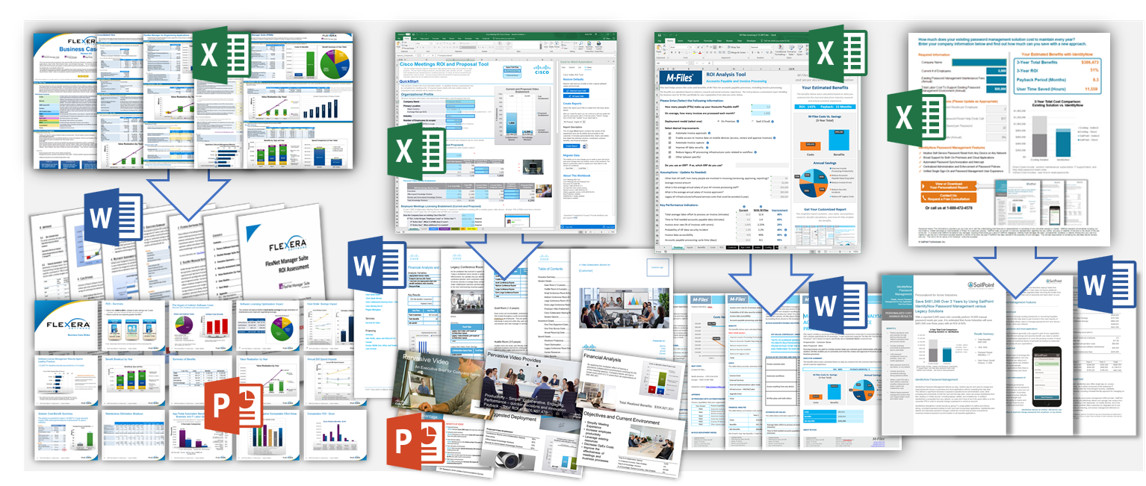
Most tools can produce Microsoft Word and PowerPoint reports. The report templates are embedded in the Excel xlsm file. Report templates use a special compressed format to minimize tool size. Microsoft Word/PowerPoint 2003, 2007, or 2010 is required to create the reports.
The reports are highly customized based on tool results. The reports can be edited; however, copyright and other notices must be included in all copies or substantial portions of the report document.
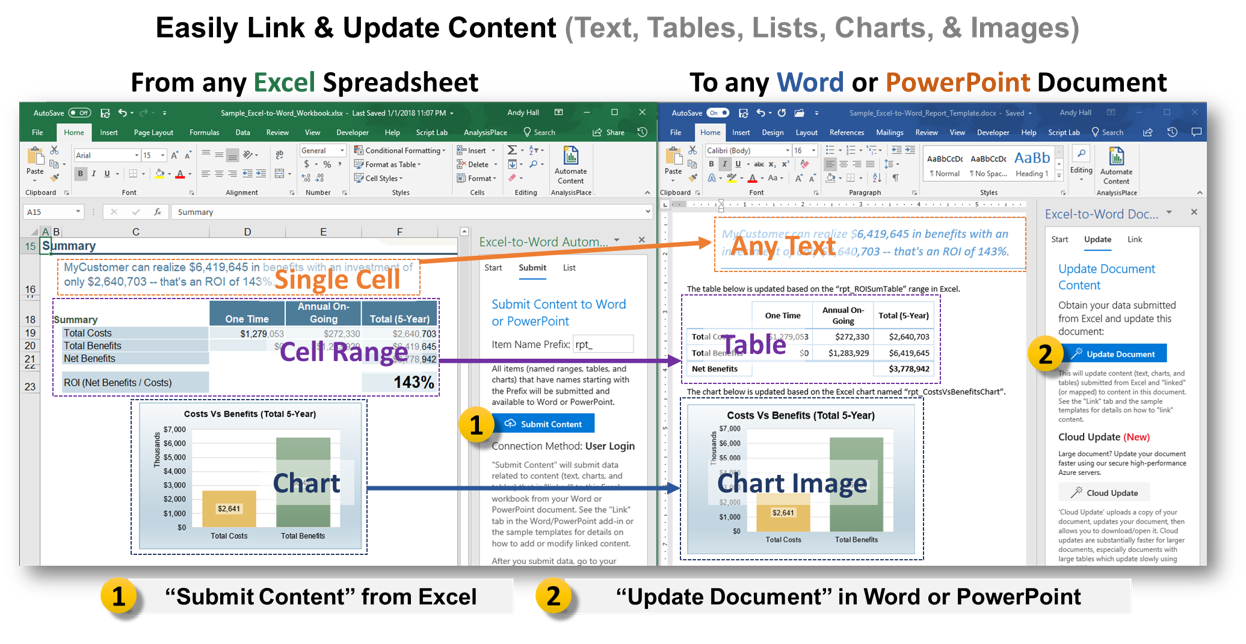
Reports can also be opened in a format that allows content to be updated as changes are made to the tool (data/charts are linked to the workbook). The reports can optionally be saved as a pdf to restrict editing by the recipient.
View a sample report.
Reports available in this tool:
|
Report title
|
Format
|
# of Pages / Slides
|
Content
|
|
Business Case Report
|
Microsoft Word
|
13
|
This Word report contains the summary Business Case. It contains the following sections:
-Executive Summary
-Tool Description and Methodology
-Company Overview
-Current Environment
-Overview of Solutions
-Solution Selected for this Analysis
-Solution Costs
-Best Practices Assessment
-Solution Benefits
-Financial Analysis
-Next Steps
|
Supported AnalysisPlace Platform Features
The table below summarizes key capabilities of the AnalysisPlace platform and support for the capabilities in this tool.
|
AnalysisPlace Platform Feature
|
Description
|
Support in the Tool
|
|
Data sync
|
Data entered into the tool will be uploaded to a secure remote server enabling features such as collaboration with other users.
|
Yes – data syncing automatically occurs during saves and prior to report creation
|
|
Strong Privacy protections
|
Information and data entered into the tool will not be shared without the user’s explicit permission
Tools are designed to minimize entry/collection of personal information
|
Yes
|
|
Security
|
Synchronized/uploaded data (entered by the user) is stored in a secure database
|
Yes
|
|
Sharing and collaboration
|
Users can invite others to collaborate on a tool assessment. For example, a sales professional can invite a prospect to view and modify an assessment.
This feature can also be used to provide user support.
|
Yes – users must be registered
|
|
Reports
|
Tools can produce Microsoft Word and PowerPoint reports
The reports are customized based on tool results, can be edited, and can be saved as a pdf to restrict editing by the recipient.
|
Yes – 13 page Microsoft Word “Business Case Report”
|
|
Multi-currency
|
Currency can be changed in the contol panel. Includes integrated currency converter; exchange rates can be updated each time the workbook is opened
|
Yes – 30 common currencies
|
|
Multi-lingual (Language switching)
|
Tool language can easily be switched from the control panel.
|
Partial support - Languages available: English, Spanish, French, German, Japanese
Non-English language content is based on machine translation and is for demonstration purposes only.
|
|
Online or offline flexibility
|
Users must be online (connected to the internet) during first login to verify credentials, but can then work offline.
|
Yes
|
|
Control Panel
|
User controls many tool features via the AnalysisPlace.com Control Panel: load assessments, create reports, change the language/currency, manage scenarios, restore default values, share with others, etc.
|
Yes
|
|
Assessment flexibility
|
Each Excel xlsm file is typically a separate assessment
Users can load and save assessments from and to their hard drives and/or from the AnalysisPlace.com servers
Assessment data (data users enter into the tools) can be synchronized with the server
The user can conduct multiple assessments with each tool (may depend on licensing)
Assessments can be made from other assessments. For example, a sales rep could start with the “Banking Industry” template when preparing a business case for a prospect in the banking industry.
|
Yes – up to 5 assessments
|
|
Scenario analysis
|
Each assessment can contain up to 10 scenarios. Switching between scenarios is easy.
|
Yes
|
|
Change Tracking
|
Indicates which cells have been modified (displays username and date)
Tool tracks user changes and allows the user to restore prior entries
User can reset default values and formulas
|
Yes
|
|
Saving/loading/sharing flexibility
|
Assessments can be saved to and opened from your harddrive or from AnalysisPlace.com storage.
Assessments can be shared with colleagues by emailing the Excel file or via the collaboration features.
|
Yes
|
|
Single Microsoft Excel XLSM file
|
No software to install – simply download an Excel file (macros must be enabled)
Extends Excel’s features/capabilities
Microsoft Word and PowerPoint reports are embedded in the Excel file
|
Yes
|
|
Easy to upgrade to new version releases
|
User assessments will almost always be compatible with new tool versions and will automatically be upgraded when the user downloads the upgraded tool
Tool indicates if a new version is available
|
Yes
|
Terms of Use
By using the software/document, you accept these terms. If you do not accept them, do not use the software.
- You may use, copy, redistribute, display, print, and reproduce this software/document
- You may NOT sell, rent, lease, or lend this software/document or portions/derivations of it
- You may NOT create derivative works from this software/document
- You may NOT "reverse-engineer" the software/document
- You may only modify portions of the software/document designated as "Input" cells (light yellow cells with double-outline and blue text).
- You must maintain all copyright and other notices contained in this software/document.
- You may incorporate only static (e.g. values, graphics) portions of this software/document within other documents (e.g. a business case report) as long as the dynamic (e.g. equations, macros) functionality of the workbook is not also incorporated or duplicated.
Disclaimer
This tool is intended to help guide organizations in better understanding approximate/potential costs and benefits. Due to limitations of simulation tools, actual results may differ significantly than results estimated in this tool. Investment decisions should not be based on the results of this model alone -- it is not intended to be a substitute for professional advice.
This information is provided to you as a tool "as is" with the understanding that there are no representations or warranties of any kind either express or implied.
In no event shall HCR or suppliers be liable for any damages, including those arising as a result of HCR or supplier negligence, whether those damages are direct, consequential, incidental, or special, flowing from your use of or inability to use the tool, or information provided herewith, or results of the tool's use, even if HCR or suppliers has been advised of the possibility of such damages.
Model Support
HCR cannot guarantee support for free downloads. However, we do encourage you to provide comments, suggestions, and feedback.
HCR can provide fee-based services, including telephonic support, workbook customizations, development of tools (e.g. ROI-based selling tools), and comprehensive consulting engagements to assist with business case development and validation.
How to Download
After purchasing*, the download link will appear in "My Account" >> "My Orders" >> "Order Details"
Do not "Open" the tool from the link. You must "Save" it to your harddrive first, then "Open" it. After enabling macros in Excel, the tool will then request your Username and Password.
*For free tools, you must "Checkout", although there is no purchase process.
Requirements
The tool requires both Microsoft Excel and Microsoft Word (for reports)
Microsoft Office versions supported: Office 2010, 2007, 2003 (partial)*,
Operating System: Windows 7, Vista, XP
*Excel 2003 Compatibility:
Some users have reported issues when opening and creating reports.
How to open in Excel 2003
- Save the file to your hard drive, then open it. “File Conversion in Progress”
- At the “This file was created in the newer version of Microsoft Excel…” message, click “OK”
- "Microsoft Office Excel is waiting for another application to complete an OLE action." Click OK
- At the Security Warning, enable macros
- The Login window should appear. Login with your AnalysisPlace.com credentials
- At the "Query Refresh" message, optionally click "Enable automatic refresh". This enables updating of exchange rates.
- The tool is opened in "Read-only" mode. Save the file as a different file name to enable some features, such as reporting.
- Note that the opening/saving operations can take several minutes because of the Conversion process. We recommend that you do not save the Excel file in .xls format because it will be extremely large.
|
|
|
|